
Fill and Sign Docs: Signeasy
Glykka LLC (dba SignEasy)Business
4.01.81K Reviews
- Version
- 16.8.0
- Installs
- 1.00M
- Age Rating
- Everyone
Screenshots

Our Review of Fill and Sign Docs: Signeasy
 Analysis by Appyee
When I need to sign a document while away from my desk, the process is only as smooth as the weakest link: finding the file, getting it to load, and sending the finished copy somewhere useful. Fill and Sign Docs: Signeasy is built for that quick handoff, but its usefulness depends partly on the connection available at each step. I find it most appealing when a document already lives in a cloud account or needs to move promptly to another person, rather than when I want a completely self-contained paperless filing system.
Where a connection changes the workflow
Pulling a document from a cloud service and sending a signed copy onward naturally makes connectivity part of the experience. A steady connection can make the path from selecting a file to sharing it feel direct. On a weak or interrupted network, the same task can involve waiting for a file to appear or for a handoff to finish. I would avoid starting a time-sensitive signing job at the last possible moment if I know I will be moving between unreliable connections.
That matters in ordinary situations: a contractor may send a PDF while I am travelling, or a school form may arrive just before a deadline. My practical habit would be to open the file while I have a dependable connection, check that it is the right version, and leave enough time to review the completed document before sending it. The signature itself may be quick; locating and transferring the correct file can take longer.
Useful on a phone, with a few mobile trade-offs
A phone is a natural fit for a quick signature because I can mark a document without finding a printer, signing by hand, and scanning it back in. Using a finger or stylus also makes sense when I need to add a signature while standing at a counter or sitting in a meeting. The small screen is less comfortable for carefully checking dense pages, tiny clauses, or several signature fields, so I would review the document at a larger size when accuracy matters.
For a two-page consent form, I might sign on the phone and then inspect the final copy before sharing it. For a long contract, I would rather read the whole document on a tablet or computer first, then use the phone only if it is the most convenient way to complete the signature. That distinction keeps the speed advantage without treating a small display as a good substitute for careful reading.
When something stalls, slow down before retrying
If a file seems stuck while loading or a share does not complete, repeatedly tapping the same control can make it harder to know whether the first attempt worked. I would check the document view and transaction history, then confirm the destination before sending again. This is especially important for forms containing personal details: an unnecessary duplicate or a rushed share is a worse outcome than taking a moment to verify the status.
A sensible recovery routine is to keep the original file available, make sure the signed copy is the one I intend to send, and retry only after the connection is stable. If a recipient says nothing arrived, I would check the sent document and use the app’s sharing options again rather than assuming that an attempted handoff reached them. A signing app can simplify the paperwork, but it cannot remove the need to confirm that the other person received the right file.
Be deliberate with cloud documents and sensitive forms
Cloud access is convenient when the document is already stored in Google Drive, Dropbox, or OneDrive, but it also means I should pay attention to which account and file I have selected. Before signing, I would check the name and contents rather than relying on a familiar folder or a recent-file position. Afterward, I would confirm where the signed version went so that I do not leave the only completed copy in an unexpected place.
For sensitive paperwork, convenience should not replace ordinary care. I would use a connection I trust, avoid sending a private form to a group chat by mistake, and review the recipient before sharing. The app’s security claims do not change those practical steps: the person signing still has to handle account access, file selection, and delivery thoughtfully.
First Impressions
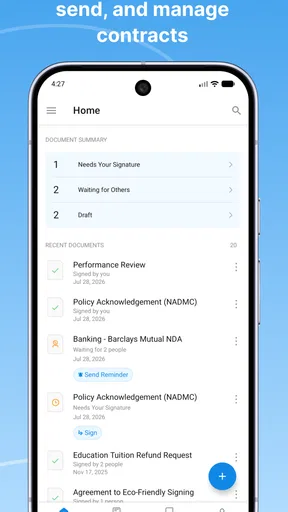
So, the first thing I noticed about Fill and Sign Docs: Signeasy was its sleek and intuitive interface. You know when an app just feels right? This was one of those moments. The design is minimalistic, making it super easy to navigate without a steep learning curve. As soon as you open it, you're greeted with a clean dashboard that gives you access to all your documents and signing options.
Features That Stand Out
Alright, let's talk features. What makes this app a must-have? First off, the app supports a wide range of file types, including PDFs, Word documents, and images. This means you’re not constantly converting files just to get them signed. That’s a win for convenience!
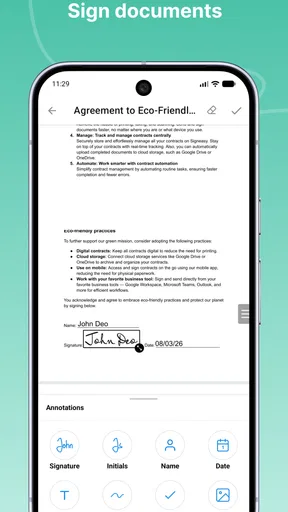
One of my favorite features is the ability to sign documents using your finger or stylus. It’s like having a mini signature pad right on your phone. Plus, it supports multiple signatures, so if you need someone else to sign, it’s no hassle at all.
- Cloud Integration
- The app integrates smoothly with cloud services like Google Drive, Dropbox, and OneDrive. This means you can pull your documents straight from the cloud and save your signed docs back to it seamlessly.
- Security
- Security is a big deal, right? The app uses SSL encryption, which is the same level of security many banks use. You can rest easy knowing your documents are safe.
Signing Made Simple
Now, onto the actual signing process. It's as easy as pie. You upload your document, tap the area where your signature is needed, and voila! You can adjust the size and position of your signature with a simple pinch and zoom. I love how the app allows you to save your signature for future use, making repeat signings even faster.
"The app makes signing documents so simple and stress-free, it’s almost fun!"
Sharing and Sending
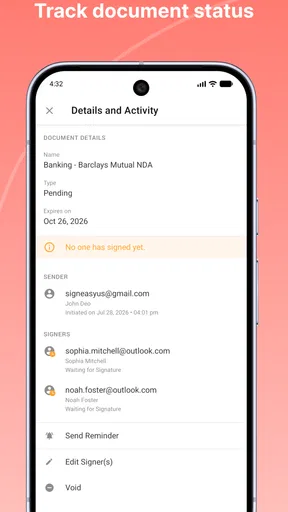
Once your document is signed, sharing it couldn’t be easier. You can email it directly from the app or share it through any messaging service you prefer. The app also keeps a history of all your transactions, which is handy if you need to trace back any documents.
- Direct email sending
- Messaging service compatibility
- Transaction history
The Little Extras
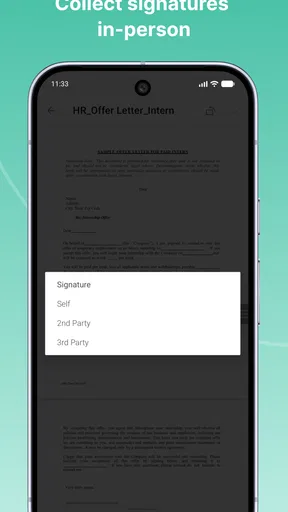
Besides the main features, there are a few extras worth mentioning. The app supports in-person signing, which is perfect for when you’re meeting clients face-to-face. And if you’re ever stuck, the customer support is top-notch. They offer quick responses and genuinely helpful solutions, which makes the whole experience even smoother.
Another perk is the app's offline capabilities. You can sign documents without an internet connection, which is a lifesaver when you're on the go and Wi-Fi is nowhere to be found.
Who will get the most from it
The app is a strong fit for people who handle occasional forms on a phone: freelancers approving a simple document, parents returning permission paperwork, or anyone who needs to sign a file without printing and scanning. It is also useful in a face-to-face meeting when the document is ready and both people can look at the screen together. In that setting, I would agree on who is signing which field before passing the device over, then review the result before sharing it.
It is less suited to someone who needs a full contract-management workflow with extensive team administration, formal approval chains, or detailed document editing. A dedicated desktop editor is better for changing complex documents, while a business e-signature platform may be a better match when many people must review and approve files in a controlled sequence. Signeasy’s appeal is the practical middle ground: get a document, add signatures, and move it along.
A realistic signing routine
Imagine I receive a Word document from a client while commuting. I would first make sure I have the right file and a reliable connection, then open it and locate the signature area. Before using a saved signature, I would check that the document is final and that the signature belongs in the intended place. After signing, I would inspect the pages for misplaced marks, save or share the completed copy, and use the transaction history to help retrace the handoff later if needed.
That last review is a useful habit, not busywork. Pinch-and-zoom placement is convenient, but a signature can look crowded against nearby text or land on the wrong line if I rush. With a stylus, I can usually make a more controlled mark than with a finger; with either one, I would zoom in before committing to a small field and zoom back out to check the page as a whole.
Choosing between a signing app and familiar alternatives
Compared with printing, signing by hand, and scanning, a phone workflow saves steps when the recipient accepts an electronic copy. Compared with opening a document in a general office app, a dedicated signing tool keeps the task focused on placing a signature and sharing the result. But neither approach is automatically best for every file: if I need to rewrite clauses, reorganize pages, or compare a complicated draft, a proper document editor is the more comfortable tool before I sign.
It is also worth separating a quick signature from a broader approval process. For a simple form, drawing or reusing a signature may be all I need. For paperwork where the order of signatures, identity checks, or an organization’s formal procedure is central, I would first confirm that this app’s workflow meets those requirements instead of assuming every electronic signature tool works the same way.
Cost, platform fit, and expectations
Signeasy is free to install, with in-app purchases listed from $4.99 to $239.99 per item, so I would check the options inside the app before relying on a particular paid capability or committing to a regular workflow. The app comes from Glykka LLC, doing business as SignEasy, and sits in the business category. Its 4.0 average from around 22,000 ratings, alongside over 1 million installs, suggests it has found a substantial audience, though those figures alone cannot tell me whether a specific plan fits my needs.
It is rated for Everyone, and the current version is 16.5.0; the minimum operating-system requirement is 7.0. I would check device compatibility before making it part of a work routine, especially on an older phone. For occasional personal forms, the free starting point may be enough to explore the workflow, while someone who signs frequently should compare the in-app purchase choices against the features they actually expect to use.
What I would check before relying on it
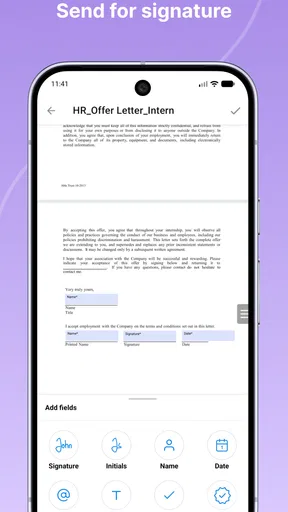
People often wonder whether a signature can be reused, whether a document can come from a cloud account, and how to send the finished copy. The app covers those practical steps with saved signatures, cloud integrations, and direct email or messaging options. I would still test the complete route with a non-urgent document first: open a file, place a signature, save or share it, and confirm the recipient can view the result. That small trial helps reveal whether the workflow suits the way I organize documents.
Another sensible question is whether it replaces every paper or office task. I would not treat it as a substitute for reading carefully, editing a complicated file, or meeting a particular organization’s signing rules. Nor would I assume that a document has been delivered simply because I tapped share. The app helps with the mechanics; checking the file, destination, and completion remains part of my job.
Final Thoughts
In the end, Fill and Sign Docs: Signeasy is a powerful tool for anyone who needs to handle documents efficiently and securely. It's become an essential part of my digital toolkit, and I honestly can’t imagine managing without it now. If you’re looking for a reliable, easy-to-use signing app, this one should be at the top of your list.
So, next time you’re caught in a bind and need to sign a document quickly, give this app a try. Trust me, you’ll wonder how you ever survived without it!
My connectivity verdict
For me, the strongest case for this app is not that it makes every document task effortless, but that it can shorten a familiar sequence when the file and recipient are within reach. Cloud access and sharing are valuable precisely because they connect signing to the rest of my day; the trade-off is that file retrieval and delivery can be affected by the network. I would prepare important paperwork before a deadline, verify the signed copy, and avoid treating a quick tap as proof that the handoff is complete.
The app is worth considering if mobile signing is a recurring convenience, especially for straightforward PDFs, Word files, and images. If my work depends on complex editing, highly structured approvals, or a workflow that must proceed regardless of connectivity, I would choose a more specialized option for those jobs. For everyday signatures, though, its focused approach makes sense—as long as I stay attentive to the document, connection, and destination.
Verdict
Strengths of Fill and Sign Docs: Signeasy
- Easy and intuitive user interface.
- Supports a variety of document formats.
- Quick document importing feature.
- Seamless integration with cloud services.
- Offers secure document storage.
Limitations of Fill and Sign Docs: Signeasy
- Limited features in the free version.
- Occasional syncing issues with cloud.
- Requires internet for full functionality.
- Editing options can be basic.
- Subscription can be pricey.
Similar Picks in This Category
View All
LinkedIn: Community & Network
LinkedIn3.8

Zoom Workplace
zoom.com4.1

Microsoft Teams
Microsoft Corporation4.6

Meta Business Suite
Meta Platforms, Inc.4.6

Webex Meetings
Cisco Systems, Inc.4.5

TeamViewer Remote Control
TeamViewer4.4
Frequently Asked Questions
What features does Fill and Sign Docs: Signeasy offer?
Fill and Sign Docs: Signeasy provides a comprehensive suite of features for handling digital documents. Users can easily upload documents, add signatures, fill out forms, and share with others. It supports various file formats such as PDF and Word, and offers cloud integration for seamless access and storage.
Is Fill and Sign Docs: Signeasy secure for handling sensitive information?
Yes, Fill and Sign Docs: Signeasy prioritizes security by employing robust encryption methods to protect your documents. It ensures that your data remains confidential and secure from unauthorized access during the signing process and while stored on its servers. It complies with industry-standard regulations for data protection.
Can I use Fill and Sign Docs: Signeasy offline?
Fill and Sign Docs: Signeasy supports offline functionality, allowing users to access and sign documents without an internet connection. Once reconnected, the app will synchronize your changes. This feature is particularly useful for users who need to work on documents while traveling or in areas with limited connectivity.
What platforms is Fill and Sign Docs: Signeasy available on?
Fill and Sign Docs: Signeasy is available on both Android and iOS platforms, making it accessible to a wide range of smartphone and tablet users. This cross-platform availability ensures that users can manage their documents seamlessly across different devices, enhancing productivity and convenience.
Does Fill and Sign Docs: Signeasy offer a free trial or subscription?
Yes, Fill and Sign Docs: Signeasy offers a free trial for new users to explore its features. After the trial period, users can choose from various subscription plans to continue using the service. The subscription provides additional features and removes limitations found in the free version, offering greater flexibility and functionality.
